InfieldHQ vs Dugout
A lineup tool, or a stats product with a lineup tool.
Dugout reads your GameChanger boxscores and recommends a batting order from your OBP, contact rate, and strike percentages. InfieldHQ is the app that runs the rest of your season and asks for no stats to build the lineup.
Free to start. Runs in the app or a browser.
InfieldHQ
Free
A rec team that already runs the season in InfieldHQ and wants the batting order and field positions built on a phone, in the parking lot, in the same app as attendance and the walk-up board.
Dugout
$19 a month, or $149 a year
A travel ball or serious rec coach who already scores every game in GameChanger and wants an OBP-first lineup, pitch-count compliance, and opponent scouting built off those numbers.
What Dugout does better
Three things, and they are not small if stats are the part you care about most.
A stats-driven lineup recommendation
Dugout recommends a batting order from your season data, with a philosophy you pick (OBP-first, contact-first, or small ball) and every recommended slot tagged with the reason. It is grounded in your actual GameChanger numbers. InfieldHQ does not read your stats, because we don't score the game. If you want a recommendation backed by QAB% and BB/K ratio, Dugout is the one. (Want it in InfieldHQ? Tell us.)
Little League pitch count compliance
Dugout tracks pitches per outing, calculates required rest days, and flags arms approaching limits before you fill out a lineup card. InfieldHQ does not track pitch counts, because we don't score the game. If pitch count compliance is the part you're most worried about, Dugout is the one. (Want it in InfieldHQ? Tell us.)
Opponent scouting from boxscores
Every boxscore you upload builds your opponent database. Before you face a team again, Dugout surfaces their top hitters and pitching patterns from previous meetings. InfieldHQ does not scout opponents. If scouting is part of how you coach, Dugout is the one. (Want it in InfieldHQ? Tell us.)
Where the two part ways
Everything both apps do the same way is on the full comparison.
Getting the lineup stood up
The week before, when somebody still has to build the thing.
How the roster gets in
- InfieldHQ: Yes.
- Add players by hand, paste a list, or import from a league registration. Jersey number, name, and any position preferences come across.
- Dugout: Partly.
- Imports from a GameChanger CSV or a boxscore PDF. No roster entry for a team that is not already in GameChanger.
How the fielding rotation is built
- InfieldHQ: Yes.
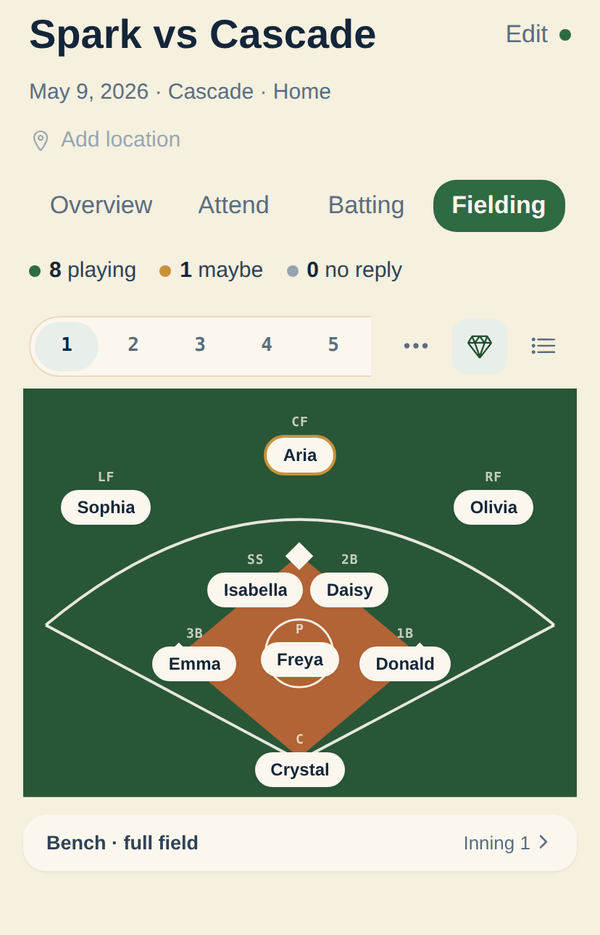
- Open an empty game and the fair rotation is already there: bench, infield, and outfield evened out across the innings you set (1 to 15, six by default), built from who is attending, with prefer honored and avoid plus pitcher/catcher eligibility hard. Tap any position to change it, copy an inning from a previous game, describe what you want in plain English, or hit Regenerate for a new variation. The draft never overwrites your edits.
- Dugout: Partly.
- Recommends a batting order from your stats (OBP-first, contact-first, or small ball). Fielding rotation is not its product. You set positions yourself.
Lock a player to a position for one inning
- InfieldHQ: Yes.
- Yes. Pin a player to a position in any inning and copy the inning to fill the rest. The lock survives an AI regenerate when you keep that player as a preference.
- Dugout: No.
- Not what it does. Recommendations come from stats, not from per-inning locks.
Mark which players are not here tonight
- InfieldHQ: Yes.
- Parents RSVP going, maybe, or out before the game. Mark a kid absent in the app and the lineup rebuilds around who is actually here. Attendance is on every row of the fielding grid.
- Dugout: No.
- Not a feature. Dugout is reading from GameChanger data, not from tonight's attendance.
Whether you can start without talking to anyone
- InfieldHQ: Yes.
- Sign up, build a team, set a lineup. No sales call. Most coaches are scoring a first player in about two minutes.
- Dugout: Partly.
- A 30-day free trial needs a card. Past that, monthly or annual. Paid by card.
Game day
The parking lot, the dugout, and the warmup window where the lineup actually gets set.
Editing the lineup on a phone
- InfieldHQ: Yes.
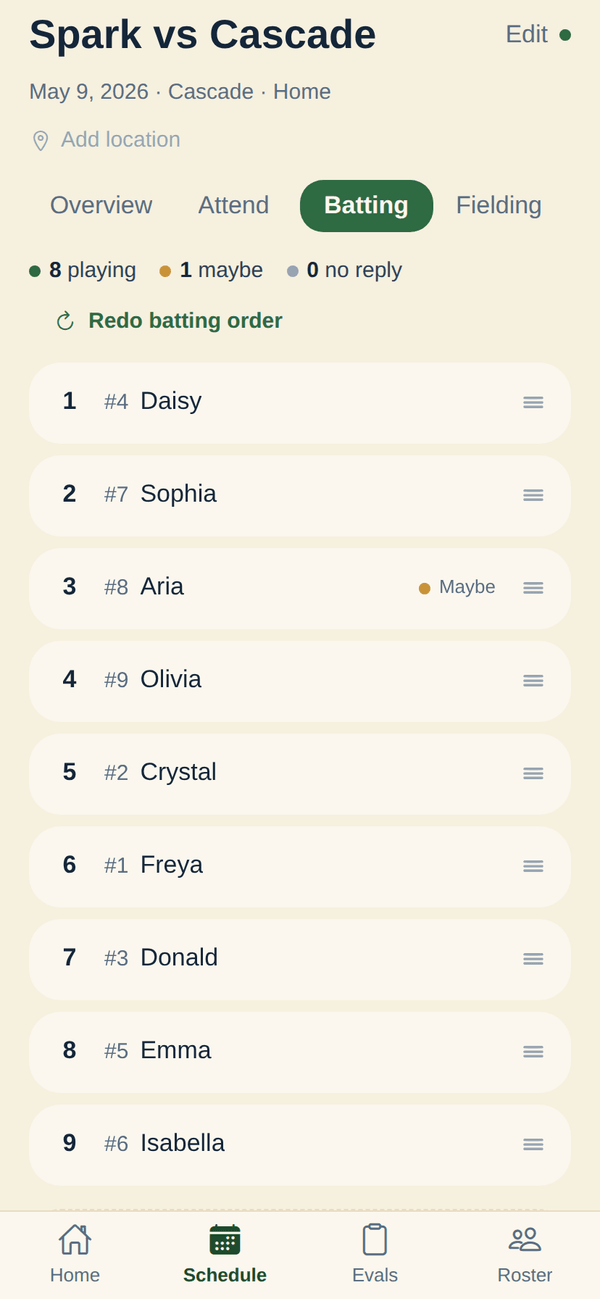
- Tap a position to drop a player in, or describe the change in plain English. Made for the phone: the fielding grid and batting order fit one phone screen.
- Dugout: Partly.
- Runs in a browser with a desktop dashboard. The screenshots on their site are desktop-first; small screens are not what they sell.
Keeping playing time fair
The questions every parent eventually asks, and what you can show them.
Auto-fair lineup by default
- InfieldHQ: Yes.
- Yes, and it is the default: open an empty game and a fair batting order plus a balanced fielding rotation are already there, built from who is attending. Turn it off per team if you prefer to set every game by hand.
- Dugout: No.
- Not what it does. Lineup recommendations are stats-driven, not fairness-driven.
See who sat two innings in a row
- InfieldHQ: Yes.
- Yes. A warning triangle flags any player who sat two set innings back to back, on the fielding grid and in the editor.
- Dugout: No.
- Not what it does.
A fairness report a parent can read
- InfieldHQ: No.
- No. The growth report is for the coach. Nothing publishes to parents today.
- Dugout: Yes.
- Shareable stat cards parents can open from their phone.
Try a change before you commit it
- InfieldHQ: Partly.
- For AI-generated lineups, the prompt preview is what-you-see-is-what-you-get. There is no slider or what-if panel for hand-edits.
- Dugout: No.
- Not documented.
Everything around the lineup
The things the lineup feeds into, and what falls out of it on game day.
Print or PDF the lineup for the dugout
- InfieldHQ: No.
- Not shipped. The lineup lives in the app; PDF or printable export is not a feature today.
- Dugout: Partly.
- Game-day dashboard is on screen, not a printable artifact.
Live game scoring and box scores
- InfieldHQ: No.
- Not shipped. InfieldHQ tracks positions, attendance, and who has played where. It does not score the game.
- Dugout: Partly.
- Reads GameChanger boxscores. Does not score the game itself.
Walk-up songs that follow the batting order
- InfieldHQ: Yes.
- DJ mode reads the lineup the coach set, plays walk-ups in that order, and moves to the next batter for you. One screen in the app that already runs the game.
- Dugout: No.
- Not what it does.
Parents RSVP from their own phone
- InfieldHQ: Yes.
- Yes. Parents open the parent side of the same app and RSVP going, maybe, or out. The coach sees the change in the lineup builder.
- Dugout: No.
- Not a feature.
Running the league as a whole
- InfieldHQ: Yes.
- League admin, team formation, divisions, registration import, and tryouts are in the same app. The lineup is one screen in the thing that runs the season.
- Dugout: No.
- Not what it does. Schedules sync from GameChanger.
What it costs
For one rec team of twelve, across a spring season.
Entry price
- InfieldHQ: Free.
- Free. No card, no trial, no plan tier. Coach features are free; the league admin side is paid (not the topic of this page).
- Dugout: $19 / month.
- 30-day free trial with a card. Then $19 a month, or $149 a year ($12.42 a month).
Subscription vs one-time
- InfieldHQ: None.
- No subscription to cancel.
- Dugout: Monthly or yearly.
- $19 a month or $149 a year. Auto-renews; cancel any time.
Whether it fits your league at all
The questions that rule a product out before any feature matters.
Sports it covers
- InfieldHQ: Partly.
- Softball and baseball. Works with the 9- or 10-player setup your league runs.
- Dugout: No.
- Baseball only. Built around Little League rules and the GameChanger youth-baseball audience.
Switching
Keep the stats in Dugout, run the game in InfieldHQ
The two products do not talk to each other. But the Dugout lineup is two screens of names you can copy into InfieldHQ in 30 seconds, and the InfieldHQ side carries attendance, field positions, and the walk-up board that follows the order.
- Use Dugout for the OBP-first batting order and the pitch count tracker
- Use InfieldHQ for attendance, field positions, and the walk-up board
- The two do not sync today, but the Dugout lineup is two screens of text to copy in
- Run InfieldHQ free alongside Dugout and cancel Dugout if you stop needing the stats
The short answer
Use Dugout if your travel ball team already scores every game in GameChanger and you want stats-driven lineups, pitch counts, and opponent scouting. It's $19 a month or $149 a year and it does that job well.
Use InfieldHQ if the fair lineup should draft itself from attendance in the same app, if the walk-up songs should follow the batting order you set, and if you'd rather not score every game in GameChanger before the lineup tool will work. It's free, and the lineup is one screen in the thing that runs the whole season.
Set your next lineup in two minutes.
Batting order, field positions, attendance, and the walk-up board. All free, all on the phone that's already in your pocket.
Free while you try it. No card, no setup call.
CheckedPrices and features verified . Found something out of date? Tell us and we’ll fix it.