Compare
The lineup tool that's already in the app that runs your season.
Every tool here builds a fair lineup in seconds, including InfieldHQ: open an empty game and the balanced order and rotation are already there, built from who's attending. The difference is everything around it: attendance, the walk-up songs in your batting order, and the season, all in the same free app.
Free to start. Runs in the app or a browser.
Which one is for you
Five products, five different jobs.
InfieldHQ
by InfieldHQ
Free
A rec team that already runs the season in InfieldHQ and wants the batting order and field positions built on a phone, in the parking lot, in the same app as attendance and the walk-up board.
See coach featuresInning Wizard
by Inning Wizard
Free, then $15 a year
A youth baseball or softball coach who wants a one-tap auto-fair lineup with saved history, and is happy working in a browser every Sunday night.
Check Inning Wizard's own pageDugout Edge
by Dugout Edge
Free, then $8 a month for premium
A rec league coach who wants a free, no-signup lineup generator with co-ed softball rules, slow-pitch and extra-hitter setups, and the option to upgrade for saved teams.
Check Dugout Edge's own pageGameTime Lineups
by GameTime Lineups
Free, or $29 once for lifetime
A coach who lives on the phone, wants a fairness report parents can read, and prefers a one-time payment over a subscription.
Check GameTime Lineups's own pageDugout
by Dugout
$19 a month, or $149 a year
A travel ball or serious rec coach who already scores every game in GameChanger and wants an OBP-first lineup, pitch-count compliance, and opponent scouting built off those numbers.
Check Dugout's own pageThe whole comparison
Grouped by when you'd actually run into it.
Getting the lineup stood up
The week before, when somebody still has to build the thing.
How the roster gets in
- InfieldHQ: Yes.
- Add players by hand, paste a list, or import from a league registration. Jersey number, name, and any position preferences come across.
- Inning Wizard: Yes.
- Paste the list, or type names in one at a time, with jersey numbers and position preferences. About two minutes the first time.
- Dugout Edge: Yes.
- Type the roster in, or create a free account and save it for next time. No CSV import on the free tier.
- GameTime Lineups: Yes.
- Paste from a spreadsheet, screenshot a roster from GameChanger or TeamSnap, or upload a CSV. It auto-detects the columns.
- Dugout: Partly.
- Imports from a GameChanger CSV or a boxscore PDF. No roster entry for a team that is not already in GameChanger.
How the fielding rotation is built
- InfieldHQ: Yes.
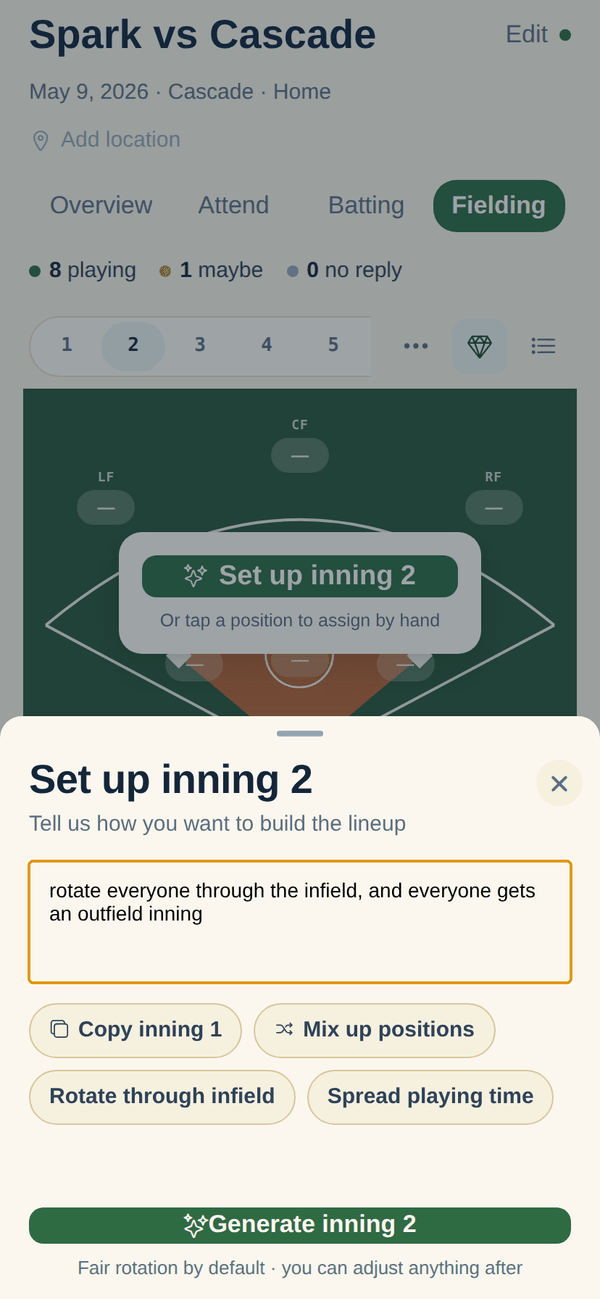
- Open an empty game and the fair rotation is already there: bench, infield, and outfield evened out across the innings you set (1 to 15, six by default), built from who is attending, with prefer honored and avoid plus pitcher/catcher eligibility hard. Tap any position to change it, copy an inning from a previous game, describe what you want in plain English, or hit Regenerate for a new variation. The draft never overwrites your edits.
- Inning Wizard: Yes.
- One-tap auto-fair: every player rotates through positions across innings, bench time is spread evenly, and you can lock a player to a spot for a specific inning.
- Dugout Edge: Yes.
- One-tap auto-fair with a competitive-priority slider that leans fun-and-participation or competitive advantage. Position preferences, position eligibility, and co-ed rules are honored.
- GameTime Lineups: Yes.
- One-tap auto-fair across Sandlot, Rec, and Travel modes, with optional player ratings (Batting/Defense, or Contact/Fielding/Power/Speed/Throwing) and continuous batting order or extra hitter.
- Dugout: Partly.
- Recommends a batting order from your stats (OBP-first, contact-first, or small ball). Fielding rotation is not its product. You set positions yourself.
How the batting order is built
- InfieldHQ: Yes.
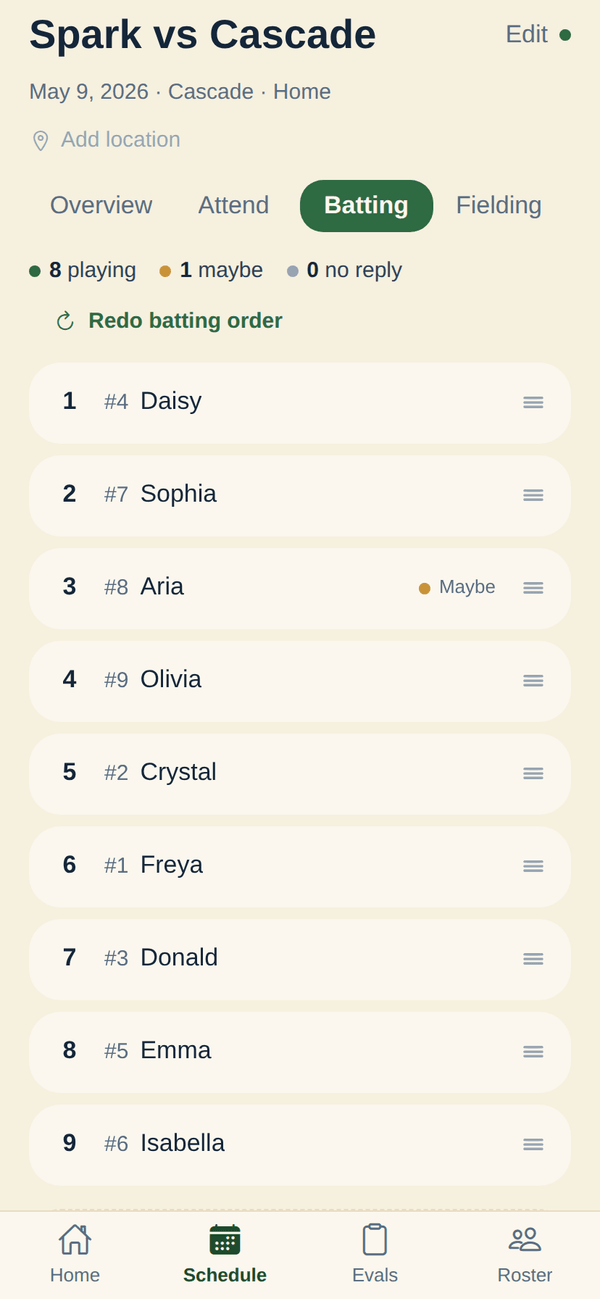
- Open an empty game and the order is already there, rotated from last game so every kid takes a turn batting first over the season. Drag batters into a new order, copy from a previous game, or describe what you want in plain English. Reorder in seconds when a kid shows up late or has to leave early.
- Inning Wizard: Yes.
- A "Balance Lineup Order" button evens out batting slots across the season so the same players are not always at the top or bottom. Fine-tune by dragging on the results screen.
- Dugout Edge: Yes.
- Drag-and-drop batting order with the generator's balance logic. Softball supports alternating male/female for co-ed leagues.
- GameTime Lineups: Yes.
- Auto-generated by the same fairness pass that handles fielding, with a What-If mode that shows how moving one player changes the season fairness before you commit.
- Dugout: Yes.
- OBP-first, contact-first, or small-ball philosophies, with every recommended slot tagged with the reason. Backed by your own GameChanger data.
Lock a player to a position for one inning
- InfieldHQ: Yes.
- Yes. Pin a player to a position in any inning and copy the inning to fill the rest. The lock survives an AI regenerate when you keep that player as a preference.
- Inning Wizard: Yes.
- Set a position preference for any player and specific inning. The generator locks them there and works around it.
- Dugout Edge: Partly.
- Premium only: "lock specific players into positions for any inning, and shuffle the rest. Locked cells stay put."
- GameTime Lineups: Yes.
- Lock a position, an inning, or a batting spot, then regenerate the rest around the locks.
- Dugout: No.
- Not what it does. Recommendations come from stats, not from per-inning locks.
Mark which players are not here tonight
- InfieldHQ: Yes.
- Parents RSVP going, maybe, or out before the game. Mark a kid absent in the app and the lineup rebuilds around who is actually here. Attendance is on every row of the fielding grid.
- Inning Wizard: Yes.
- Before generating, mark the players who are not at this game. The lineup is built only for the players who are here.
- Dugout Edge: Yes.
- Per-inning attendance: mark which innings each player is available (arrives late, leaves early), and the generator adjusts.
- GameTime Lineups: Yes.
- Uncheck a player and regenerate in about 30 seconds. Use it when a kid calls out at warmups.
- Dugout: No.
- Not a feature. Dugout is reading from GameChanger data, not from tonight's attendance.
Whether you can start without talking to anyone
- InfieldHQ: Yes.
- Sign up, build a team, set a lineup. No sales call. Most coaches are scoring a first player in about two minutes.
- Inning Wizard: Yes.
- Try it with no account. Free plan needs a sign-up to save; everything else works without one.
- Dugout Edge: Yes.
- No sign-up required to use the free lineup generator. An optional free account saves your team.
- GameTime Lineups: Yes.
- A free plan with no credit card. Paid is a one-time purchase, not a subscription.
- Dugout: Partly.
- A 30-day free trial needs a card. Past that, monthly or annual. Paid by card.
Game day
The parking lot, the dugout, and the warmup window where the lineup actually gets set.
Editing the lineup on a phone
- InfieldHQ: Yes.
- Tap a position to drop a player in, or describe the change in plain English. Made for the phone: the fielding grid and batting order fit one phone screen.
- Inning Wizard: Partly.
- Runs in a browser. You can edit and drag, but the page was designed at desktop size and squashes on a small screen.
- Dugout Edge: Partly.
- Runs in a browser. The free generator is usable on a phone; the premium game-day board is a separate screen.
- GameTime Lineups: Yes.
- Built for the phone first. Their own copy: "Other tools want you to squint at a spreadsheet on a 6-inch screen. GameTime was built for the phone first."
- Dugout: Partly.
- Runs in a browser with a desktop dashboard. The screenshots on their site are desktop-first; small screens are not what they sell.
Sharing the lineup with parents and staff
- InfieldHQ: Yes.
- Parents see the schedule and RSVP from their own phone in the same app. A share-by-link for the lineup itself is not shipped.
- Inning Wizard: Partly.
- Export as CSV or print the dugout sheet. No parent-side view of the lineup as a live page.
- Dugout Edge: Partly.
- PDF or CSV export, plus a magnetic lineup board you can buy. No in-app parent share.
- GameTime Lineups: Yes.
- A shareable lineup graphic for the team chat, plus a view-only link parents can open from a phone. Assistant coaches get their own login on the paid tier.
- Dugout: Yes.
- Shareable player stat cards, and opponent scouting before each game. Schedule syncs from GameChanger.
Runs in a browser, nothing to install
- InfieldHQ: Yes.
- Runs in a browser for coaches, parents, and evaluators, plus an iPhone app. The Android app lands before September.
- Inning Wizard: Yes.
- Browser only. Works on phones and tablets out of the box.
- Dugout Edge: Yes.
- Browser only, with separate practice-planner, scorekeeping, and chalkboard pages.
- GameTime Lineups: Yes.
- Browser only. Their copy: "No laptop required. Ever."
- Dugout: Yes.
- Browser only. No native app.
Keeping playing time fair
The questions every parent eventually asks, and what you can show them.
Auto-fair lineup by default
- InfieldHQ: Yes.
- Yes, and it is the default: open an empty game and a fair batting order plus a balanced fielding rotation are already there, built from who is attending. Turn it off per team if you prefer to set every game by hand.
- Inning Wizard: Yes.
- Every player rotates through positions across innings; bench time is distributed evenly. The marketing line is "fair, balanced lineups in seconds".
- Dugout Edge: Yes.
- A fairness algorithm that balances playing time, position rotation, and your competitive-priority slider. The page is built around this claim.
- GameTime Lineups: Yes.
- Auto-fair lineup with a Basic rating (batting/defense) or an Advanced rating (Contact/Fielding/Power/Speed/Throwing).
- Dugout: No.
- Not what it does. Lineup recommendations are stats-driven, not fairness-driven.
See who sat two innings in a row
- InfieldHQ: Yes.
- Yes. A warning triangle flags any player who sat two set innings back to back, on the fielding grid and in the editor.
- Inning Wizard: Partly.
- Not surfaced in the UI. The generator avoids it by construction, but no explicit "this kid is sitting too much" flag.
- Dugout Edge: Partly.
- The generator avoids it by construction and the editor "highlights any potential issues with your changes". Close to the same thing, less explicit.
- GameTime Lineups: Partly.
- The fairness grade surfaces it after the fact: "a player-by-player breakdown of innings played, positions started, and bench time" on the paid tier.
- Dugout: No.
- Not what it does.
Season totals across every game
- InfieldHQ: Yes.
- Lineup History: a batting rotation matrix (players by past games, leadoff highlighted, season leadoff totals) plus a fielding balance scorecard (infield, outfield, bench, pitcher and catcher per player, least-balanced first) with a "could use more infield" nudge. The Player Growth Report carries the same mix per player.
- Inning Wizard: Yes.
- Every lineup you generate is saved. View the season, see who played which position when, and reuse as a starting point.
- Dugout Edge: Partly.
- Saved lineups and team history are a premium feature.
- GameTime Lineups: Yes.
- Save every game, mark wins and losses, and watch playing-time trends across the season. Position distribution charts and a batting-order heatmap are on the paid tier.
- Dugout: Yes.
- Season trends for every metric they read off your GameChanger exports: QAB%, OBP, strike%, BB/K ratio.
A fairness report a parent can read
- InfieldHQ: No.
- No. The growth report is for the coach. Nothing publishes to parents today.
- Inning Wizard: Partly.
- A printable coaching sheet with hit-tracking boxes, but no parent-facing fairness report.
- Dugout Edge: No.
- Not a feature.
- GameTime Lineups: Yes.
- A fairness PDF export on the paid tier, with a player-by-player breakdown and a batting-order heatmap. The copy: "the report you pull up when a parent asks why their kid only played one inning of infield."
- Dugout: Yes.
- Shareable stat cards parents can open from their phone.
Try a change before you commit it
- InfieldHQ: Partly.
- For AI-generated lineups, the prompt preview is what-you-see-is-what-you-get. There is no slider or what-if panel for hand-edits.
- Inning Wizard: No.
- Not a feature. Generate, drag, print.
- Dugout Edge: No.
- Not documented.
- GameTime Lineups: Yes.
- What-If mode on the paid tier: move a player into a different spot and watch the season fairness grade move in real time before you commit.
- Dugout: No.
- Not documented.
Everything around the lineup
The things the lineup feeds into, and what falls out of it on game day.
Print or PDF the lineup for the dugout
- InfieldHQ: No.
- Not shipped. The lineup lives in the app; PDF or printable export is not a feature today.
- Inning Wizard: Yes.
- Two print copies: a big-text dugout sheet and a coaching sheet with hit-tracking boxes and a diamond for marking plays.
- Dugout Edge: Yes.
- PDF and CSV export at no cost, on the free tier.
- GameTime Lineups: Yes.
- PDF for the clipboard, a shareable lineup graphic for the team chat, and CSV export of rosters and lineups.
- Dugout: Partly.
- Game-day dashboard is on screen, not a printable artifact.
Live game scoring and box scores
- InfieldHQ: No.
- Not shipped. InfieldHQ tracks positions, attendance, and who has played where. It does not score the game.
- Inning Wizard: No.
- Not what it does.
- Dugout Edge: Yes.
- A separate Game Day Scoring app, free, no account needed. Pitch counts and playing time tracking on the same board.
- GameTime Lineups: No.
- Not what it does.
- Dugout: Partly.
- Reads GameChanger boxscores. Does not score the game itself.
Walk-up songs that follow the batting order
- InfieldHQ: Yes.
- DJ mode reads the lineup the coach set, plays walk-ups in that order, and moves to the next batter for you. One screen in the app that already runs the game.
- Inning Wizard: No.
- Not what it does.
- Dugout Edge: No.
- Not what it does.
- GameTime Lineups: No.
- Not what it does.
- Dugout: No.
- Not what it does.
Parents RSVP from their own phone
- InfieldHQ: Yes.
- Yes. Parents open the parent side of the same app and RSVP going, maybe, or out. The coach sees the change in the lineup builder.
- Inning Wizard: No.
- Not a feature.
- Dugout Edge: No.
- Not a feature.
- GameTime Lineups: Partly.
- A view-only link parents can open to see the lineup, but RSVP happens elsewhere.
- Dugout: No.
- Not a feature.
Running the league as a whole
- InfieldHQ: Yes.
- League admin, team formation, divisions, registration import, and tryouts are in the same app. The lineup is one screen in the thing that runs the season.
- Inning Wizard: No.
- Not what it does.
- Dugout Edge: Partly.
- Practice planner, drill library, schedule maker, tournament bracket. All separate tools on the site, not a league admin surface.
- GameTime Lineups: Partly.
- A leagues and organizations tier with league-wide fairness reporting, playing-time compliance, and centralized coach management. Custom pricing.
- Dugout: No.
- Not what it does. Schedules sync from GameChanger.
What it costs
For one rec team of twelve, across a spring season.
Entry price
- InfieldHQ: Free.
- Free. No card, no trial, no plan tier. Coach features are free; the league admin side is paid (not the topic of this page).
- Inning Wizard: Free.
- Free plan: 1 team, 12 players, 6 innings, 10 lineup generations.
- Dugout Edge: Free.
- Free lineup generator, no signup. Premium features on a 7-day trial, then $8 a month.
- GameTime Lineups: Free.
- Free plan: 1 team, 10 saved lineups, up to 15 players. Paid is a one-time purchase, not a subscription.
- Dugout: $19 / month.
- 30-day free trial with a card. Then $19 a month, or $149 a year ($12.42 a month).
Charges per player
- InfieldHQ: None.
- No per-player fee, ever. Twelve players or twenty costs the same.
- Inning Wizard: Banded.
- Free caps at 12 players. Paid Individual ($15/year) raises that ceiling.
- Dugout Edge: None.
- No per-player fee on the free or the $8/month premium tier.
- GameTime Lineups: None.
- No per-player fee. The free tier caps at 15 players, the paid tier does not.
- Dugout: None.
- No per-player fee. One subscription covers one team of any size.
Subscription vs one-time
- InfieldHQ: None.
- No subscription to cancel.
- Inning Wizard: Yearly.
- Yearly subscription, $15. No monthly option published.
- Dugout Edge: Monthly.
- $8 a month for premium. Free tier does not need a subscription.
- GameTime Lineups: One-time.
- Founding Coach is $29 paid once, yours for life. After the first 200 spots it goes to $49 lifetime.
- Dugout: Monthly or yearly.
- $19 a month or $149 a year. Auto-renews; cancel any time.
Whether it fits your league at all
The questions that rule a product out before any feature matters.
Sports it covers
- InfieldHQ: Partly.
- Softball and baseball. Works with the 9- or 10-player setup your league runs.
- Inning Wizard: Partly.
- Baseball. Softball is a separate generator on the same site.
- Dugout Edge: Yes.
- Baseball and softball, including co-ed softball, 10-player slow pitch with a short fielder, extra hitter, and whole-team batting.
- GameTime Lineups: Yes.
- Baseball and softball, tee ball to high school. Continuous batting order or extra hitter.
- Dugout: No.
- Baseball only. Built around Little League rules and the GameChanger youth-baseball audience.
Phones it runs on
- InfieldHQ: Yes.
- Runs in a browser on any phone, plus an iPhone app. The Android app lands before September.
- Inning Wizard: Yes.
- Runs in a browser on any phone.
- Dugout Edge: Yes.
- Runs in a browser on any phone.
- GameTime Lineups: Yes.
- Runs in a browser on any phone. Built for mobile first.
- Dugout: Yes.
- Runs in a browser on any phone. Desktop screenshots are the primary surface.
Setup rules it knows about
- InfieldHQ: Partly.
- 9 or 10 players. No co-ed gender-balance rules, no slow-pitch rover, no extra-hitter slot, no mandatory-play rule per division. The position picker shows nine softball positions plus a tenth "extra" spot.
- Inning Wizard: Partly.
- Innings from 6 to 9+. Roster sizes from 8 to 20+. No co-ed rules; softball is a separate product.
- Dugout Edge: Yes.
- Co-ed softball with alternating batting order and minimum male/female fielding. 10-player slow pitch with a short fielder. Extra hitter. Whole-team batting. Custom innings and position sets.
- GameTime Lineups: Yes.
- Continuous batting order or extra hitter. 5 to 7 innings. Sandlot, Rec, and Travel philosophies. 9 to 15 players.
- Dugout: Partly.
- Little League pitch count rules are built in. Position eligibility is per-player; no co-ed or softball-specific rules.
What the lineup-only tools do better
Two things, and they're real.
Print or PDF the dugout card
Inning Wizard prints a big-text dugout sheet and a coaching sheet with hit-tracking boxes and a diamond. Dugout Edge exports PDF and CSV at no cost. GameTime exports PDF, CSV, and a shareable graphic for the team chat. InfieldHQ does not print or export a lineup today, and a coach whose dugout runs on paper has a real reason to use one of those instead. (Want it in InfieldHQ? Tell us.)
A fairness report a parent can read
GameTime exports a fairness PDF with a player-by-player breakdown and a batting-order heatmap, and Dugout shares stat cards parents open from their phone. Our season views, Lineup History and the Player Growth Report, are both for the coach. Nothing publishes to parents today, and "did my kid get fair time?" still gets answered in words, not in a link. (Want it in InfieldHQ? Tell us.)
Both of those are about the lineup leaving the app: onto paper, or into a parent's hands. What breaks game day isn't the printout, it's that the roster was wrong, attendance wasn't checked, and the walk-up song for the third batter is on someone else's phone. That's the part we built.
Where we're different
Three things that fall out of the lineup being one screen in the app that already runs the season.
The fair lineup builds itself
Open an empty game and the balanced order and rotation are already there, built from who's attending: batting rotated from last game, bench, infield, and outfield evened out. Drag anything, tap Regenerate for a new variation, or turn the whole thing off per team.
The walk-up board reads the order
DJ mode plays the batting order the coach just set, and moves to the next batter for you. The lineup you make on Tuesday is the lineup the walk-up board plays on Saturday, with no second roster to maintain.
The lineup isn't the end
Tryout scores become teams. Teams play a schedule with attendance and field positions and walk-up songs. The whole season runs in one app, and the lineup is one screen in it.
Fielding
Open the game. The fair field is already set.
A new game starts with the rotation done: every attending player placed, bench time spread evenly, nobody parked anywhere all game. Prefer and avoid choices are honored, and the draft never overwrites your edits. Want it your way instead? Tap to assign, describe it in plain English, or turn the auto-draft off for the team.
- Auto-drafted from attendance, on by default per team
- Bench, infield, and outfield evened out across your innings
- Tap any position to change it, or Regenerate for a new rotation
- Fair-play flags when a kid sits two innings in a row
Questions worth asking
Is it really free?
Yes. Coach features (batting order, field positions, attendance, DJ mode) are free, and the lineup is part of that. The paid side of InfieldHQ is the league admin and the season: registration import, divisions, team formation. The lineup itself never asks for a card.
Does it auto-build a fair lineup?
Yes, and it's the default. Open an empty game and the balanced batting order and fielding rotation are already there, built from who's attending. Drag to reorder, tap any position to change it, hit Regenerate for a new variation, or turn auto-draft off for the team if you prefer to set every game by hand.
Can I see playing time across the season?
Lineup History shows the batting rotation matrix, every past game, the leadoff slot highlighted, season leadoff totals, and a fielding balance scorecard sorted least-balanced first with a "could use more infield" nudge. It's for coaches and league admins; nothing publishes to parents today.
Can I print the lineup?
Not today. The lineup lives in the app. If your dugout runs on paper, Inning Wizard and Dugout Edge both print, and that is a real reason to use one of them. (Want it in InfieldHQ? Tell us.)
What about Little League pitch count rules?
Dugout tracks pitch counts and rest-day compliance from your GameChanger data. We don't, because we don't score the game. If pitch counts are the part you're most worried about, Dugout is the one. (Want it in InfieldHQ? Tell us.)
Do my assistant coaches need accounts?
No. They sign in with their own email through your league invite, or they open the lineup on their phone through the parent side.
Does it work on Android?
Through the browser today, on any phone. The Android app lands before September.
Do I have to use the rest of InfieldHQ?
No. The lineup works on its own. Most coaches add attendance after the first game and the walk-up board after the second, because the app is already in their pocket.
One on one
Just comparing against one of them?
Set your next lineup in two minutes.
Batting order, field positions, attendance, and the walk-up board that follows them. All free, all on the phone that's already in your pocket.
Free while you try it. No card, no setup call.
CheckedPrices and features verified . Found something out of date? Tell us and we’ll fix it.