InfieldHQ vs Dugout Edge
Both free. Both run in a browser. Built for different jobs.
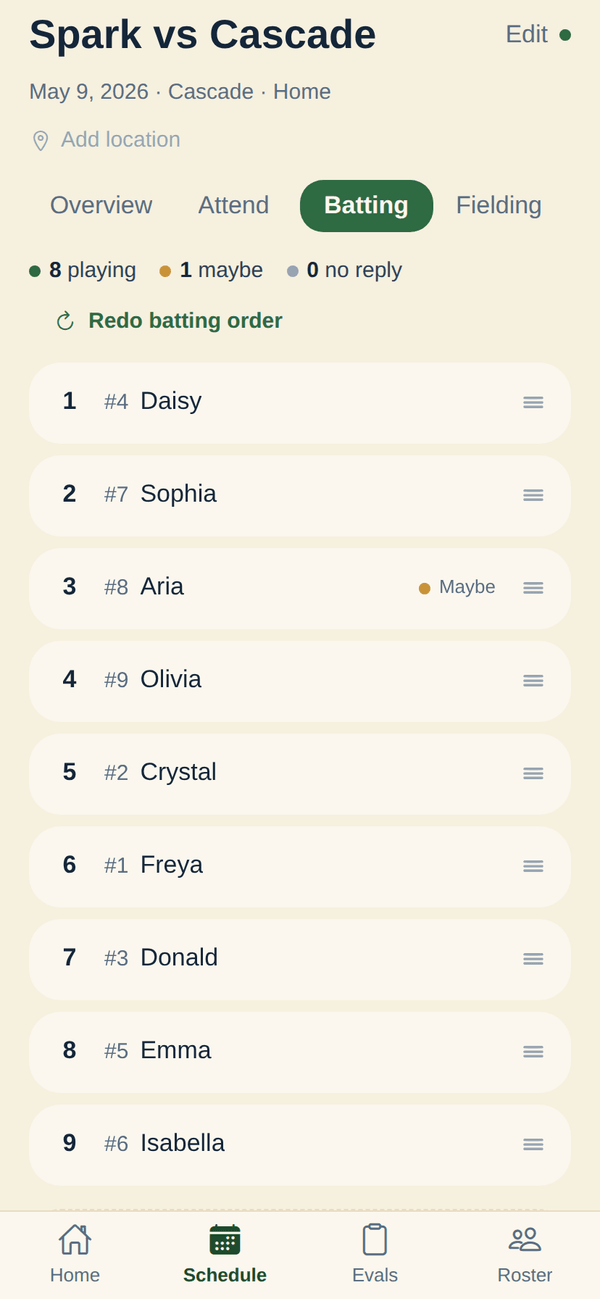
Dugout Edge is the free lineup generator that handles co-ed softball, slow-pitch rovers, and extra hitters. InfieldHQ is the free team app where the lineup lives next to attendance and the walk-up board.
Free to start. Runs in the app or a browser.
InfieldHQ
Free
A rec team that already runs the season in InfieldHQ and wants the batting order and field positions built on a phone, in the parking lot, in the same app as attendance and the walk-up board.
Dugout Edge
Free, then $8 a month for premium
A rec league coach who wants a free, no-signup lineup generator with co-ed softball rules, slow-pitch and extra-hitter setups, and the option to upgrade for saved teams.
What Dugout Edge does better
Two things: the setups rec ball actually runs, and the printout.
Co-ed softball, slow pitch, and the setups most rec leagues actually run
Co-ed softball with alternating male/female batting order and minimum male/female fielding. 10-player slow pitch with a short fielder. Extra hitter. Whole-team batting. InfieldHQ works with the 9 or 10 player setup your league runs, but does not enforce co-ed gender-balance rules, slow-pitch rover, or the extra-hitter slot. (Want it in InfieldHQ? Tell us.)
Print or PDF the lineup at no cost
A printable PDF and a CSV export, both on the free tier, no signup required. InfieldHQ does not print or export a lineup today, and a coach whose dugout runs on paper has a real reason to use Dugout Edge. (Want it in InfieldHQ? Tell us.)
Where the two part ways
Everything both apps do the same way is on the full comparison.
Getting the lineup stood up
The week before, when somebody still has to build the thing.
Lock a player to a position for one inning
- InfieldHQ: Yes.
- Yes. Pin a player to a position in any inning and copy the inning to fill the rest. The lock survives an AI regenerate when you keep that player as a preference.
- Dugout Edge: Partly.
- Premium only: "lock specific players into positions for any inning, and shuffle the rest. Locked cells stay put."
Game day
The parking lot, the dugout, and the warmup window where the lineup actually gets set.
Editing the lineup on a phone
- InfieldHQ: Yes.
- Tap a position to drop a player in, or describe the change in plain English. Made for the phone: the fielding grid and batting order fit one phone screen.
- Dugout Edge: Partly.
- Runs in a browser. The free generator is usable on a phone; the premium game-day board is a separate screen.
Sharing the lineup with parents and staff
- InfieldHQ: Yes.
- Parents see the schedule and RSVP from their own phone in the same app. A share-by-link for the lineup itself is not shipped.
- Dugout Edge: Partly.
- PDF or CSV export, plus a magnetic lineup board you can buy. No in-app parent share.
Keeping playing time fair
The questions every parent eventually asks, and what you can show them.
See who sat two innings in a row
- InfieldHQ: Yes.
- Yes. A warning triangle flags any player who sat two set innings back to back, on the fielding grid and in the editor.
- Dugout Edge: Partly.
- The generator avoids it by construction and the editor "highlights any potential issues with your changes". Close to the same thing, less explicit.
Season totals across every game
- InfieldHQ: Yes.
- Lineup History: a batting rotation matrix (players by past games, leadoff highlighted, season leadoff totals) plus a fielding balance scorecard (infield, outfield, bench, pitcher and catcher per player, least-balanced first) with a "could use more infield" nudge. The Player Growth Report carries the same mix per player.
- Dugout Edge: Partly.
- Saved lineups and team history are a premium feature.
Try a change before you commit it
- InfieldHQ: Partly.
- For AI-generated lineups, the prompt preview is what-you-see-is-what-you-get. There is no slider or what-if panel for hand-edits.
- Dugout Edge: No.
- Not documented.
Everything around the lineup
The things the lineup feeds into, and what falls out of it on game day.
Print or PDF the lineup for the dugout
- InfieldHQ: No.
- Not shipped. The lineup lives in the app; PDF or printable export is not a feature today.
- Dugout Edge: Yes.
- PDF and CSV export at no cost, on the free tier.
Live game scoring and box scores
- InfieldHQ: No.
- Not shipped. InfieldHQ tracks positions, attendance, and who has played where. It does not score the game.
- Dugout Edge: Yes.
- A separate Game Day Scoring app, free, no account needed. Pitch counts and playing time tracking on the same board.
Walk-up songs that follow the batting order
- InfieldHQ: Yes.
- DJ mode reads the lineup the coach set, plays walk-ups in that order, and moves to the next batter for you. One screen in the app that already runs the game.
- Dugout Edge: No.
- Not what it does.
Parents RSVP from their own phone
- InfieldHQ: Yes.
- Yes. Parents open the parent side of the same app and RSVP going, maybe, or out. The coach sees the change in the lineup builder.
- Dugout Edge: No.
- Not a feature.
Running the league as a whole
- InfieldHQ: Yes.
- League admin, team formation, divisions, registration import, and tryouts are in the same app. The lineup is one screen in the thing that runs the season.
- Dugout Edge: Partly.
- Practice planner, drill library, schedule maker, tournament bracket. All separate tools on the site, not a league admin surface.
What it costs
For one rec team of twelve, across a spring season.
Subscription vs one-time
- InfieldHQ: None.
- No subscription to cancel.
- Dugout Edge: Monthly.
- $8 a month for premium. Free tier does not need a subscription.
Whether it fits your league at all
The questions that rule a product out before any feature matters.
Sports it covers
- InfieldHQ: Partly.
- Softball and baseball. Works with the 9- or 10-player setup your league runs.
- Dugout Edge: Yes.
- Baseball and softball, including co-ed softball, 10-player slow pitch with a short fielder, extra hitter, and whole-team batting.
Setup rules it knows about
- InfieldHQ: Partly.
- 9 or 10 players. No co-ed gender-balance rules, no slow-pitch rover, no extra-hitter slot, no mandatory-play rule per division. The position picker shows nine softball positions plus a tenth "extra" spot.
- Dugout Edge: Yes.
- Co-ed softball with alternating batting order and minimum male/female fielding. 10-player slow pitch with a short fielder. Extra hitter. Whole-team batting. Custom innings and position sets.
Switching
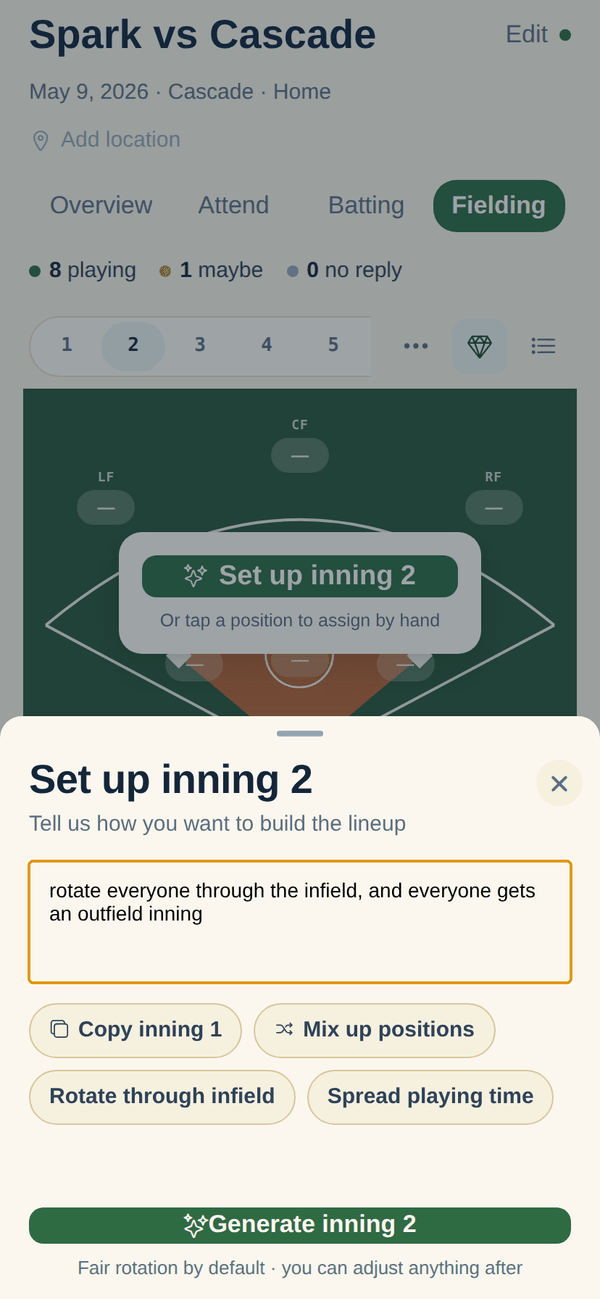
Open the game. The fair rotation is already there.
If you came from Dugout Edge, the generate step feels familiar: one tap, balanced rotation. The difference is what surrounds it: attendance drives the draft, and the walk-up board plays the order you set. The thing to check before switching is your league setup: co-ed gender rules, the slow-pitch rover, and the extra hitter are Dugout Edge territory.
- Auto-drafted from attendance, the same one-tap idea
- Regenerate for a new variation, or drag and tap anything
- Check the setups first: co-ed rules and slow pitch live here, not with us
- The walk-up board reads the order when the game starts
The short answer
Use Dugout Edge if you want a free no-signup lineup generator with co-ed softball rules, slow-pitch and extra-hitter setups, and a printable PDF. It does that job well, and the $8 a month premium unlocks saved teams and lineup history.
Use InfieldHQ if the fair lineup should draft itself from attendance in the same app, if the walk-up songs should follow the batting order you set, and if you'd rather have the lineup live next to the rest of the game-day app. It's free, and the lineup is one screen in the thing that runs the whole season.
Set your next lineup in two minutes.
Batting order, field positions, attendance, and the walk-up board. All free, all on the phone that's already in your pocket.
Free while you try it. No card, no setup call.
CheckedPrices and features verified . Found something out of date? Tell us and we’ll fix it.